Java Project – Sudoku Game
In this project, we will create a FirstCode Sudoku Game in Java using Swing and the Abstract Window Toolkit.
About Java Sudoku Game
Sudoku is a popular logical puzzle game in which a grid consisting of several regions is to be filled with numbers so that every row, column, and region contains only one instance of each number. A 9×9 grid is the most common, in which each of the nine 3×3 subgrids (also known as “boxes”) contains all of the digits from 1 to 9.
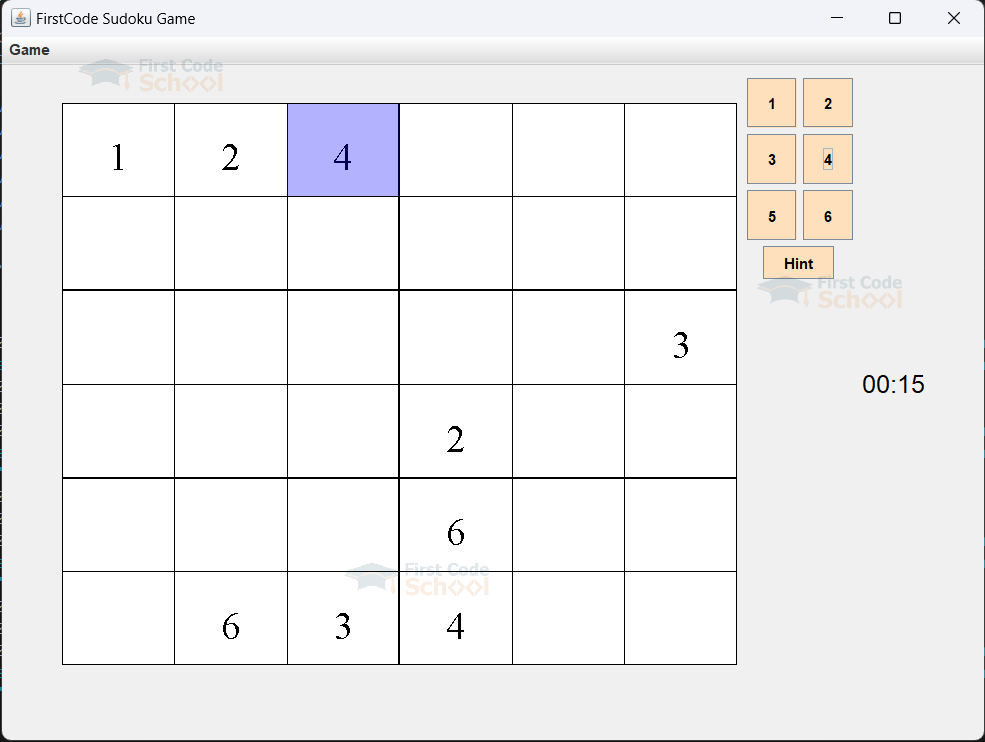
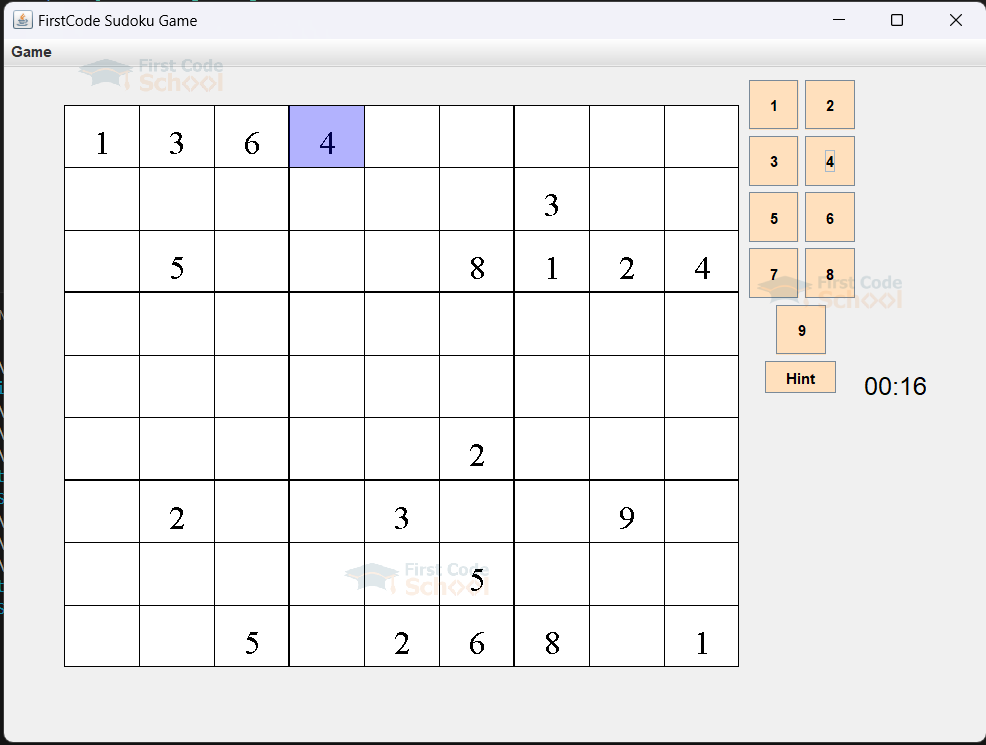
My FirstCode Sudoku Game Project contains two modes: 6×6 and 9×9. It also includes a timer to help the user improve and a hint button to assist them in the game.
Prerequisites for Java Sudoku Game
Before proceeding forward, make sure you have a proper understanding of some concepts, like :
- IDE Used: Visual Studio Code (you can use any IDE)
- Java should be appropriately installed on the machine.
- Your Concepts of Java should be clear.
- Java provides, by default, packages such as Abstract Window Toolkit (AWT) & Swing packages to create a graphical user interface (GUI) for our FirstCode Sudoku Game.
- Understanding of Event-Driven Programming
Download the Java Sudoku Game
Please download the source code of the Java Sudoku Game Project: Java Sudoku Game Project Code
Project File Structure
Our project consists of five components. Let’s take a look at our project structure to understand properly:
- SudokuFrame: SudokuFrame is the main window of the Sudoku application. It contains the menu, buttons, Sudoku panel, and the game timer. It handles the main user interactions and manages the game state.
- SudokuPanel: The SudokuPanel is responsible for displaying the Sudoku puzzle and handling user interactions with it.
- SudokuGenerator: SudokuGenerator is responsible for creating random Sudoku puzzles. It generates a complete puzzle and then removes specific values to create a playable puzzle.
- SudokuPuzzle: SudokuPuzzle represents the Sudoku board. It manages the state of the board, including placing and validating moves.
- SudokuPuzzleType: SudokuPuzzleType is an enum that defines the types of Sudoku puzzles available (6×6 and 9×9).
Code Implementation of Java Sudoku Game
Let’s try to understand each of them one by one
1. Sudoku Frame
- First, we import all the necessary libraries for the project
import java.awt.Color;
import java.awt.Dimension;
import java.awt.FlowLayout;
import java.awt.Font;
import java.awt.event.ActionEvent;
import java.awt.event.ActionListener;
import java.util.Timer;
import java.util.TimerTask;
import javax.swing.JButton;
import javax.swing.JFrame;
import javax.swing.JLabel;
import javax.swing.JMenu;
import javax.swing.JMenuBar;
import javax.swing.JMenuItem;
import javax.swing.JPanel;
import javax.swing.SwingUtilities;
import javax.swing.border.LineBorder;
- Defines the SudokuFrame class, which extends JFrame, thereby creating a window and declaring the instance variables. Constructor is used to initialise the frame, set properties, and construct the UI components
public class SudokuFrame extends JFrame {

    private JPanel buttonSelectionPanel;
    private SudokuPanel sPanel;
    private Timer timer;
    private long startTime;
    private JButton hintButton;
    private JLabel timerLabel;

    public SudokuFrame() {
        this.setTitle("FirstCode Sudoku Game");
        this.setMinimumSize(new Dimension(800, 600));

        this.getContentPane().setBackground(new Color(240, 240, 240));
- After that, we created the menu bar and added menu items for starting new games.
- We created a new JPanel named windowPanel, which ensures components are arranged left to right with the help of the FlowLayout Manager.
- ButtonSelectionPanel is a panel used to hold buttons for number selection.
- SPanel is a custom panel designed to display the Sudoku grid, featuring a white background and a black border.
- At last, both SPanel and ButtonSelectionPanel are added to windowPanel, which is then added to the SudokuFrame.
- Initializes the timer label to display game time.
JMenuBar menuBar = new JMenuBar();
        JMenu file = new JMenu("Game");
        JMenu newGame = new JMenu("New Game");
        JMenuItem sixBySixGame = new JMenuItem("6 By 6 Game");
        sixBySixGame.addActionListener(new NewGameListener(SudokuPuzzleType.SIXBYSIX, 30));
        JMenuItem nineByNineGame = new JMenuItem("9 By 9 Game");
        nineByNineGame.addActionListener(new NewGameListener(SudokuPuzzleType.NINEBYNINE, 26));

        newGame.add(sixBySixGame);
        newGame.add(nineByNineGame);

        file.add(newGame);
        menuBar.add(file);
        this.setJMenuBar(menuBar);

        JPanel windowPanel = new JPanel();
        windowPanel.setLayout(new FlowLayout());
        windowPanel.setPreferredSize(new Dimension(800, 600));
        windowPanel.setBackground(new Color(240, 240, 240));

        buttonSelectionPanel = new JPanel();
        buttonSelectionPanel.setPreferredSize(new Dimension(90, 500));
        buttonSelectionPanel.setBackground(new Color(240, 240, 240));

        sPanel = new SudokuPanel();
        sPanel.setBackground(new Color(255, 255, 255));
        sPanel.setBorder(new LineBorder(new Color(0, 0, 0), 1));

        windowPanel.add(sPanel);
        windowPanel.add(buttonSelectionPanel);
        this.add(windowPanel);

        timerLabel = new JLabel("00:00");
        timerLabel.setFont(new Font("Arial", Font.PLAIN, 20));
        timerLabel.setForeground(new Color(0, 0, 0));
        windowPanel.add(timerLabel);

        setupHintButton();
        rebuildInterface(SudokuPuzzleType.NINEBYNINE, 26);
        startTimer();
    }
- We declare setupHintButton() to configure the hint Button and its Action Listener.
- With the help of provideHint(), we can fill an empty spot with the correct value.
- startTimer() creates a new timer task that updates a timer label every second with the elapsed time since it started. stopTimer() cancels the timer if it’s running, effectively stopping the timer.
private void setupHintButton() {
        hintButton = new JButton("Hint");
        hintButton.addActionListener(new ActionListener() {
            @Override
            public void actionPerformed(ActionEvent e) {
                provideHint();
            }
        });
        hintButton.setBackground(new Color(255, 224, 189));
        hintButton.setForeground(new Color(0, 0, 0));
        buttonSelectionPanel.add(hintButton);
    }

    private void provideHint() {
        SudokuPuzzle puzzle = sPanel.getPuzzle();

        for (int row = 0; row < puzzle.getNumRows(); row++) {
            for (int col = 0; col < puzzle.getNumColumns(); col++) {
                if (puzzle.isSlotAvailable(row, col)) {
                    String correctValue = puzzle.getCorrectValue(row, col);

                    puzzle.makeMove(row, col, correctValue, false);

                    sPanel.newSudokuPuzzle(puzzle);

                    sPanel.repaint();

                    return;
                }
            }
        }
    }

    public void startTimer() {
        if (timer != null) {
            timer.cancel();
        }
        timer = new Timer();
        startTime = System.currentTimeMillis();
        timer.scheduleAtFixedRate(new TimerTask() {
            @Override
            public void run() {
                long elapsedTime = System.currentTimeMillis() - startTime;
                long seconds = elapsedTime / 1000;
                long minutes = seconds / 60;
                long remainingSeconds = seconds % 60;
                String formattedTime = String.format("%02d:%02d", minutes, remainingSeconds);

                SwingUtilities.invokeLater(() -> timerLabel.setText(formattedTime));
            }
        }, 0, 1000);
    }

    public void stopTimer() {
        if (timer != null) {
            timer.cancel();
        }
    }
- rebuildInterface() is used to update the Sudoku interface. It generates a new Sudoku, updates the interface with the latest puzzle, sets the font size, and adds buttons for puzzle values.
- startNewGame() stops and then restarts the timer, generating a new puzzleType as specified.
- NewGameListener is an ActionListener implementation that triggers startNewGame() when an action event occurs.
- main() is the entry point of the application. It initializes the SudokuFrame and sets it visible on the Swing event dispatch thread.
public void rebuildInterface(SudokuPuzzleType puzzleType, int fontSize) {
        SudokuPuzzle generatedPuzzle = new SudokuGenerator().generateRandomSudoku(puzzleType);
        sPanel.newSudokuPuzzle(generatedPuzzle);
        sPanel.setFontSize(fontSize);
        buttonSelectionPanel.removeAll();
        for (String value : generatedPuzzle.getValidValues()) {
            JButton b = new JButton(value);
            b.setPreferredSize(new Dimension(40, 40));
            b.setBackground(new Color(255, 224, 189));
            b.setForeground(new Color(0, 0, 0));
            b.addActionListener(sPanel.new NumActionListener());
            buttonSelectionPanel.add(b);
        }
        buttonSelectionPanel.add(hintButton);
        buttonSelectionPanel.revalidate();
        buttonSelectionPanel.repaint();
        sPanel.repaint();
    }

    private void startNewGame(SudokuPuzzleType puzzleType, int fontSize) {
        stopTimer();
        startTimer();
        rebuildInterface(puzzleType, fontSize);
    }

    private class NewGameListener implements ActionListener {
        private SudokuPuzzleType puzzleType;
        private int fontSize;

        public NewGameListener(SudokuPuzzleType puzzleType, int fontSize) {
            this.puzzleType = puzzleType;
            this.fontSize = fontSize;
        }

        @Override
        public void actionPerformed(ActionEvent e) {
            startNewGame(puzzleType, fontSize);
        }
    }

    public static void main(String[] args) {
        SwingUtilities.invokeLater(new Runnable() {
            @Override
            public void run() {
                SudokuFrame frame = new SudokuFrame();
                frame.setVisible(true);
            }
        });
    }
}
2. Sudoku Panel
- First, we import all the necessary libraries for the project
import java.awt.BasicStroke;
import java.awt.Color;
import java.awt.Dimension;
import java.awt.Font;
import java.awt.Graphics;
import java.awt.Graphics2D;
import java.awt.event.ActionEvent;
import java.awt.event.ActionListener;
import java.awt.event.MouseEvent;
import java.awt.font.FontRenderContext;
import javax.swing.JButton;
import javax.swing.JPanel;
import javax.swing.event.MouseInputAdapter;
- Now, define the Sudoku Panel class, which extends JPanel, and declare the instance variables. Constructor is used to initialize the variables and panel with a default Sudoku puzzle or a provided puzzle.
- newSudokuPuzzle() updates the puzzle with a new Sudoku puzzle. setFontSize() sets the font size for displaying numbers.
public class SudokuPanel extends JPanel {

    private SudokuPuzzle puzzle;
    private int currentlySelectedCol;
    private int currentlySelectedRow;
    private int usedWidth;
    private int usedHeight;
    private int fontSize;

    public SudokuPanel() {
        this.setPreferredSize(new Dimension(540, 450));
        this.addMouseListener(new SudokuPanelMouseAdapter());
        this.puzzle = new SudokuGenerator().generateRandomSudoku(SudokuPuzzleType.NINEBYNINE);
        currentlySelectedCol = -1;
        currentlySelectedRow = -1;
        usedWidth = 0;
        usedHeight = 0;
        fontSize = 26;
    }

    public void newSudokuPuzzle(SudokuPuzzle puzzle) {
        this.puzzle = puzzle;
    }

    public void setFontSize(int fontSize) {
        this.fontSize = fontSize;
    }

    public SudokuPuzzle getPuzzle() {
        return puzzle;
    }
- paintComponent() handles the rendering of the Sudoku grid. It calculates slotWidth, slotHeight, usedWidth, usedHeight, and with the help of the Graphic object g, it completes the rendering.
- After that, we drew vertical and horizontal grid lines for a Sudoku grid. It iterates through the coordinates of each line, setting the stroke width to 2 pixels for box boundaries.
- We created a new font object, it iterates over each cell to draw the numbers. It positions the numbers centrally within each cell and highlights the currently selected cell.
@Override
    protected void paintComponent(Graphics g) {
        super.paintComponent(g);
        Graphics2D g2d = (Graphics2D) g;
        g2d.setColor(new Color(1.0f, 1.0f, 1.0f));

        int slotWidth = this.getWidth() / puzzle.getNumColumns();
        int slotHeight = this.getHeight() / puzzle.getNumRows();

        usedWidth = (this.getWidth() / puzzle.getNumColumns()) * puzzle.getNumColumns();
        usedHeight = (this.getHeight() / puzzle.getNumRows()) * puzzle.getNumRows();

        g2d.fillRect(0, 0, usedWidth, usedHeight);

        g2d.setColor(new Color(0.0f, 0.0f, 0.0f));
        for (int x = 0; x <= usedWidth; x += slotWidth) {
            if ((x / slotWidth) % puzzle.getBoxWidth() == 0) {
                g2d.setStroke(new BasicStroke(2));
                g2d.drawLine(x, 0, x, usedHeight);
            } else {
                g2d.setStroke(new BasicStroke(1));
                g2d.drawLine(x, 0, x, usedHeight);
            }
        }
        for (int y = 0; y <= usedHeight; y += slotHeight) {
            if ((y / slotHeight) % puzzle.getBoxHeight() == 0) {
                g2d.setStroke(new BasicStroke(2));
                g2d.drawLine(0, y, usedWidth, y);
            } else {
                g2d.setStroke(new BasicStroke(1));
                g2d.drawLine(0, y, usedWidth, y);
            }
        }

        Font f = new Font("Times New Roman", Font.PLAIN, fontSize);
        g2d.setFont(f);
        FontRenderContext fContext = g2d.getFontRenderContext();
        for (int row = 0; row < puzzle.getNumRows(); row++) {
            for (int col = 0; col < puzzle.getNumColumns(); col++) {
                if (!puzzle.isSlotAvailable(row, col)) {
                    int textWidth = (int) f.getStringBounds(puzzle.getValue(row, col), fContext).getWidth();
                    int textHeight = (int) f.getStringBounds(puzzle.getValue(row, col), fContext).getHeight();
                    g2d.drawString(puzzle.getValue(row, col), (col * slotWidth) + ((slotWidth / 2) - (textWidth / 2)),
                            (row * slotHeight) + ((slotHeight / 2) + (textHeight / 2)));
                }
            }
        }
        if (currentlySelectedCol != -1 && currentlySelectedRow != -1) {
            g2d.setColor(new Color(0.0f, 0.0f, 1.0f, 0.3f));
            g2d.fillRect(currentlySelectedCol * slotWidth, currentlySelectedRow * slotHeight, slotWidth, slotHeight);
        }
    }
- messageFromNumActionListener() handles the action when a button is clicked. It checks if a cell in the Sudoku grid is selected, then makes a move in the puzzle and updates the display.
- NumActionListener class listens to the button clicks and responds to them.
- The SudokuPanelMouseAdapter class will handle mouse clicks.
public void messageFromNumActionListener(String buttonValue) {
        if (currentlySelectedCol != -1 && currentlySelectedRow != -1) {
            puzzle.makeMove(currentlySelectedRow, currentlySelectedCol, buttonValue, true);
            repaint();
        }
    }

    public class NumActionListener implements ActionListener {
        @Override
        public void actionPerformed(ActionEvent e) {
            messageFromNumActionListener(((JButton) e.getSource()).getText());
        }
    }

    private class SudokuPanelMouseAdapter extends MouseInputAdapter {
        @Override
        public void mouseClicked(MouseEvent e) {
            if (e.getButton() == MouseEvent.BUTTON1) {
                int slotWidth = usedWidth / puzzle.getNumColumns();
                int slotHeight = usedHeight / puzzle.getNumRows();
                currentlySelectedRow = e.getY() / slotHeight;
                currentlySelectedCol = e.getX() / slotWidth;
                e.getComponent().repaint();
            }
        }
    }
}
3. Sudoku Generator
- At First we import all the necessary libraries for the project
import java.util.ArrayList;
import java.util.Arrays;
import java.util.List;
import java.util.Random;
- Define the Sudoku Generator class in which we declare generateRandomSudoku() for the generation of a random Sudoku puzzle.
- A SudokuPuzzle object with specified dimensions and valid values is created.
- A copy of the puzzle is made and partially filled with random values. With the help of backtrackSudokuSolver(), we solve the partially filled puzzle and then remove random values to create our sudoku puzzle.
public class SudokuGenerator {

    public SudokuPuzzle generateRandomSudoku(SudokuPuzzleType puzzleType) {
        SudokuPuzzle puzzle = new SudokuPuzzle(puzzleType.getRows(), puzzleType.getColumns(), puzzleType.getBoxWidth(), puzzleType.getBoxHeight(), puzzleType.getValidValues());
        SudokuPuzzle copy = new SudokuPuzzle(puzzle);

        Random randomGenerator = new Random();

        List<String> notUsedValidValues =  new ArrayList<String>(Arrays.asList(copy.getValidValues()));
        for(int r = 0;r < copy.getNumRows();r++) {
            int randomValue = randomGenerator.nextInt(notUsedValidValues.size());
            copy.makeMove(r, 0, notUsedValidValues.get(randomValue), true);
            notUsedValidValues.remove(randomValue);
        }
        backtrackSudokuSolver(0, 0, copy);

        int numberOfValuesToKeep = (int)(0.22222*(copy.getNumRows()*copy.getNumRows()));

        for(int i = 0;i < numberOfValuesToKeep;) {
            int randomRow = randomGenerator.nextInt(puzzle.getNumRows());
            int randomColumn = randomGenerator.nextInt(puzzle.getNumColumns());

            if(puzzle.isSlotAvailable(randomRow, randomColumn)) {
                puzzle.makeMove(randomRow, randomColumn, copy.getValue(randomRow, randomColumn), false);
                i++;
            }
        }

        return puzzle;
    }
- We declare backtrackSudokuSolver(), a recursive backtracking algorithm to solve partially filled puzzles.
- With the help of a loop, we iterate over each valid value and verify that it is valid in the corresponding slot. After that, we check if the puzzle is solved.
- We handle the backtracking logic and make the slot empty if no valid value is found.
private boolean backtrackSudokuSolver(int r,int c,SudokuPuzzle puzzle) {
        if(!puzzle.inRange(r,c)) {
            return false;
        }

        if(puzzle.isSlotAvailable(r, c)) {

            for(int i = 0;i < puzzle.getValidValues().length;i++) {

                if(!puzzle.numInRow(r, puzzle.getValidValues()[i]) && !puzzle.numInCol(c,puzzle.getValidValues()[i]) && !puzzle.numInBox(r,c,puzzle.getValidValues()[i])) {

                    puzzle.makeMove(r, c, puzzle.getValidValues()[i], true);

                    if(puzzle.boardFull()) {
                        return true;
                    }

                    if(r == puzzle.getNumRows() - 1) {
                        if(backtrackSudokuSolver(0,c + 1,puzzle)) return true;
                    } else {
                        if(backtrackSudokuSolver(r + 1,c,puzzle)) return true;
                    }
                }
            }
        }

        else {
            if(r == puzzle.getNumRows() - 1) {
                return backtrackSudokuSolver(0,c + 1,puzzle);
            } else {
                return backtrackSudokuSolver(r + 1,c,puzzle);
            }
        }

        puzzle.makeSlotEmpty(r, c);

        return false;
    }
}
4. Sudoku PuzzleType
- First, we define the SudokuPuzzleType enum and then define a constant representing Sudoku puzzles. We proceed forward by defining instance variables.
- Declare a private constructor to initialize those variables.
- Now, we will declare various methods to retrieve the number of rows, columns, BoxHeight, BoxWidth, and ValidValues.
package sudoku;

public enum SudokuPuzzleType {
    SIXBYSIX(6,6,3,2,new String[] {"1","2","3","4","5","6"},"6 By 6 Game"),
    NINEBYNINE(9,9,3,3,new String[] {"1","2","3","4","5","6","7","8","9"},"9 By 9 Game");

    private final int rows;
    private final int columns;
    private final int boxWidth;
    private final int boxHeight;
    private final String [] validValues;

    private SudokuPuzzleType(int rows,int columns,int boxWidth,int boxHeight,String [] validValues,String desc) {
        this.rows = rows;
        this.columns = columns;
        this.boxWidth = boxWidth;
        this.boxHeight = boxHeight;
        this.validValues = validValues;
    }

    public int getRows() {
        return rows;
    }

    public int getColumns() {
        return columns;
    }

    public int getBoxWidth() {
        return boxWidth;
    }

    public int getBoxHeight() {
        return boxHeight;
    }

    public String [] getValidValues() {
        return validValues;
    }

}
5. Sudoku Puzzle
- Define SudokuPuzzle class and initialize the instance variables. SudokuPuzzle constructor is used to initialize them. Define another constructor that will help us save the current state.
public class SudokuPuzzle {

    protected String[][] board;
    protected boolean[][] mutable;
    private final int ROWS;
    private final int COLUMNS;
    private final int BOXWIDTH;
    private final int BOXHEIGHT;
    private final String[] VALIDVALUES;

    public SudokuPuzzle(int rows, int columns, int boxWidth, int boxHeight, String[] validValues) {
        this.ROWS = rows;
        this.COLUMNS = columns;
        this.BOXWIDTH = boxWidth;
        this.BOXHEIGHT = boxHeight;
        this.VALIDVALUES = validValues;
        this.board = new String[ROWS][COLUMNS];
        this.mutable = new boolean[ROWS][COLUMNS];
        initializeBoard();
        initializeMutableSlots();
    }

    public SudokuPuzzle(SudokuPuzzle puzzle) {
        this.ROWS = puzzle.ROWS;
        this.COLUMNS = puzzle.COLUMNS;
        this.BOXWIDTH = puzzle.BOXWIDTH;
        this.BOXHEIGHT = puzzle.BOXHEIGHT;
        this.VALIDVALUES = puzzle.VALIDVALUES;
        this.board = new String[ROWS][COLUMNS];
        for (int r = 0; r < ROWS; r++) {
            for (int c = 0; c < COLUMNS; c++) {
                board[r][c] = puzzle.board[r][c];
            }
        }
        this.mutable = new boolean[ROWS][COLUMNS];
        for (int r = 0; r < ROWS; r++) {
            for (int c = 0; c < COLUMNS; c++) {
                this.mutable[r][c] = puzzle.mutable[r][c];
            }
        }
    }
- Define Getter methods to get dimensions and valid values of the puzzle.
- Now we write the code to make a move and validate it by checking the row, column, and box to ensure the value is not already present in them.
public int getNumRows() {
    return this.ROWS;
}

public int getNumColumns() {
    return this.COLUMNS;
}

public int getBoxWidth() {
    return this.BOXWIDTH;
}

public int getBoxHeight() {
    return this.BOXHEIGHT;
}

public String[] getValidValues() {
    return this.VALIDVALUES;
}

public void makeMove(int row, int col, String value, boolean isMutable) {
    if (this.isValidValue(value) && this.isValidMove(row, col, value) && this.isSlotMutable(row, col)) {
        this.board[row][col] = value;
        this.mutable[row][col] = isMutable;
    }
}

public boolean isValidMove(int row, int col, String value) {
    if (this.inRange(row, col)) {
        if (!this.numInCol(col, value) && !this.numInRow(row, value) && !this.numInBox(row, col, value)) {
            return true;
        }
    }
    return false;
}

public boolean numInCol(int col, String value) {
    if (col <= this.COLUMNS) {
        for (int row = 0; row < this.ROWS; row++) {
            if (this.board[row][col].equals(value)) {
                return true;
            }
        }
    }
    return false;
}

public boolean numInRow(int row, String value) {
    if (row <= this.ROWS) {
        for (int col = 0; col < this.COLUMNS; col++) {
            if (this.board[row][col].equals(value)) {
                return true;
            }
        }
    }
    return false;
}

public boolean numInBox(int row, int col, String value) {
    if (this.inRange(row, col)) {
        int boxRow = row / this.BOXHEIGHT;
        int boxCol = col / this.BOXWIDTH;

        int startingRow = (boxRow * this.BOXHEIGHT);
        int startingCol = (boxCol * this.BOXWIDTH);

        for (int r = startingRow; r <= (startingRow + this.BOXHEIGHT) - 1; r++) {
            for (int c = startingCol; c <= (startingCol + this.BOXWIDTH) - 1; c++) {
                if (this.board[r][c].equals(value)) {
                    return true;
                }
            }
        }
    }
    return false;
}
- We define isSlotAvailable() and isSlotMutable() to check if a slot is empty, and getValue() to fill that particular slot.
- getCorrectValue() is used to generate a random, valid value.
- By defining various utility methods like makeSlotEmpty(), boardFull(), etc, to check if the board is full, and making a slot empty.
public boolean isSlotAvailable(int row, int col) {
        return (this.inRange(row, col) && this.board[row][col].equals("") && this.isSlotMutable(row, col));
    }

    public String getCorrectValue(int row, int col) {
        Random rand = new Random();
        List<String> values = Arrays.asList(this.VALIDVALUES);
        while (true) {
            String value = values.get(rand.nextInt(values.size()));
            if (this.isValidMove(row, col, value)) {
                return value;
            }
        }
    }

    public boolean isSlotMutable(int row, int col) {
        return this.mutable[row][col];
    }

    public String getValue(int row, int col) {
        if (this.inRange(row, col)) {
            return this.board[row][col];
        }
        return "";
    }

    public String[][] getBoard() {
        return this.board;
    }

    private boolean isValidValue(String value) {
        for (String str : this.VALIDVALUES) {
            if (str.equals(value))
                return true;
        }
        return false;
    }

    public boolean inRange(int row, int col) {
        return row <= this.ROWS && col <= this.COLUMNS && row >= 0 && col >= 0;
    }

    public boolean boardFull() {
        for (int r = 0; r < this.ROWS; r++) {
            for (int c = 0; c < this.COLUMNS; c++) {
                if (this.board[r][c].equals(""))
                    return false;
            }
        }
        return true;
    }

    public void makeSlotEmpty(int row, int col) {
        this.board[row][col] = "";
    }
- toString() is used to convert the board to a string for display.
- initializeBoard() is used to initialize the board to empty strings.
- initializeMutableSlots() sets all slots to mutable.
@Override
    public String toString() {
        String str = "Game Board:\n";
        for (int row = 0; row < this.ROWS; row++) {
            for (int col = 0; col < this.COLUMNS; col++) {
                str += this.board[row][col] + " ";
            }
            str += "\n";
        }
        return str + "\n";
    }

    private void initializeBoard() {
        for (int row = 0; row < this.ROWS; row++) {
            for (int col = 0; col < this.COLUMNS; col++) {
                this.board[row][col] = "";
            }
        }
    }

    private void initializeMutableSlots() {
        for (int row = 0; row < this.ROWS; row++) {
            for (int col = 0; col < this.COLUMNS; col++) {
                this.mutable[row][col] = true;
            }
        }
    }
}
Java Sudoku Game Output
Conclusion
We have completed our objective of creating a Sudoku Game in Java. In this Project, we used various functionalities of Swing, AWT and the basics of Java. We maintained proper modularity in the project, allowing us to easily add more functionality if needed.
I hoped you liked this project. Thank You.