Control Statements in Java- if else, switch and Loops explained
In this article, we will examine the control statements present in the Java programming language. We will first discuss the need for control statements and then the types of control flow statements.
We will then dive deeper into each type, examining its subtypes (if any), syntax, and a flowchart to understand better how it works.
Note that each subtopic in this article has already been covered in great detail, as we have separate articles on each control flow statement. So, if you are interested in learning more about a particular topic or exploring more code, feel free to check out our articles on control flow statements.
What is the need for control flow statements?
Java is a programming language in which programs are executed from top to bottom, in other words, linearly. This means the code is executed in the order it is written, one after the other.
When we need to divert the flow or repeat a set of instructions, Java provides a set of statements called control flow statements. These statements help ensure the program’s smooth flow and allow us to control the code’s flow.
What are the types of control flow statements in Java?
Java has three types of control flow statements; let us take a look at these three types and the control flow statements that fall under them:
1. Decision-Making statements
a. if statements
b. switch statement
2. Loop statements
a. do while loop
b. while loop
c. for loop
3. Jump statements
a. break statement
b. continue statement
Let’s take a deep dive into each type and explore what they have to offer.
Decision-making statements in Java
The name says it all; these statements make a decision based on the Boolean condition provided. If the given condition results in true, a specific set of instructions is executed, and if it results in false, another set of instructions is executed.
Decision-making statements come in two types: if statements and switch statements. Let us first take a look at the if statement.
If statement in Java
If-else statements allow for decision-making in programming. They help us write code that only runs when a condition is true.
There are four types of if statements in Java:
i. If statements
ii. If-Else statements
iii. If-ElseIf-Else statements
IV. Nested if statements
Let us briefly examine each type as we discuss the syntax, flowchart, and program.
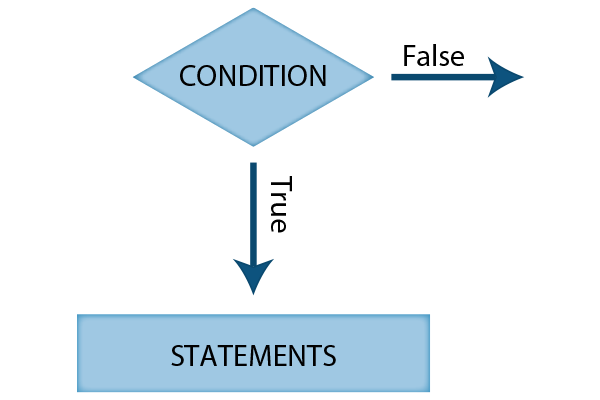
i. If statements in Java
In this type of If-Else statement, the code inside the If block will be executed if the condition is true, and nothing will be executed if the condition is false. This is a simple if statement.
Syntax:
If (condition)
{
    <statments>
}
Flowchart:
Example:
public class Main
{
    public static void main(String[] args)
    {
        String x = "FirstCode";
        if(x == "FirstCode")
        {
            System.out.print("The string is FirstCode");
        }
    }
}
Output:
The string is FirstCode
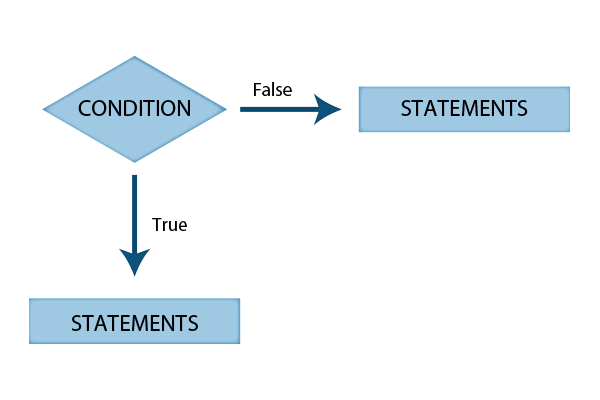
ii. If-Else statement in Java
In this type of If-Else statement, a block of code will be executed if the condition is true, and another block of code will be executed if the condition is false.
Syntax:
If (condition)
{
    <statments>
}
Else
{
    <statments>
}
Flowchart:
Example:
public class Main
{
    public static void main(String[] args)
    {
        String x = "Java";
        if(x == "FirstCode")
        {
            System.out.print("The string is FirstCode");
        }
        else
        {
            System.out.print("The string is not FirstCode");
        }
    }
}
Output:
The string is not FirstCode
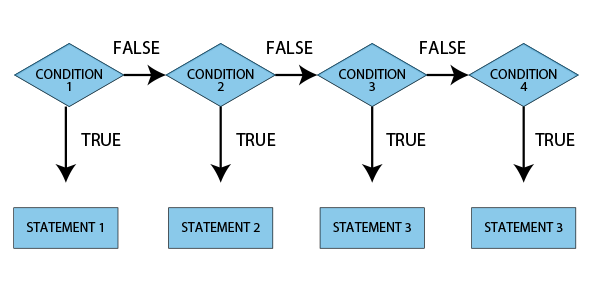
iii. If-ElseIf-Else statement in Java
In this type of If-Else statement, a group of statements is executed if the given condition is true, and another group of statements is executed if it is false. This process continues in a loop.
Syntax:
If (condition)
{
    <statments>
}
ElseIf
{
    <statments>
}
Else
{
    <statments>
}
Flowchart:
Example:
public class Main
{
    public static void main(String[] args)
    {
        String x = "Ferarri";
        if(x == "FirstCode")
        {
            System.out.print("The string is FirstCode");
        }
        else if (x == "Java")
        {
            System.out.print("The string is Java");
        }
        else
        {
            System.out.print("The string is neither FirstCode nor Java");
        }
    }
}
Output:
The string is neither FirstCode nor Java
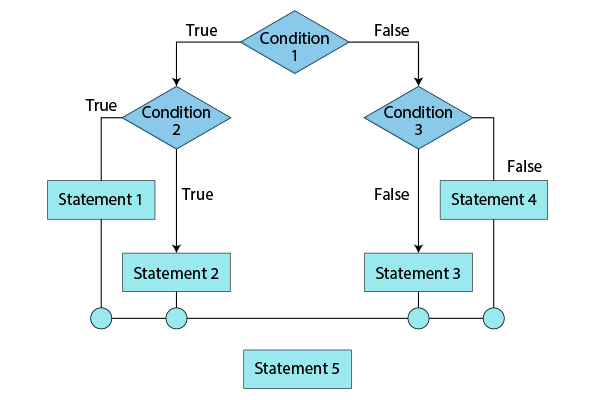
IV. Nested If-Else statement in Java
In this type of If-Else statement, we will have an if statement within an if statement.
Syntax:
If (condition)
{
    <statments>
    If (condition)
{
        <statments>
}
Else
{
        <statments>
}
}
ElseIf
{
    <statments>
}
Else
{
    <statments>
}
Flowchart:
Example:
public class Main
{
    public static void main(String[] args)
    {
        String x = "FirstCode";
        int y = 10
        if(x == "FirstCode")
        {
            System.out.print("The string is FirstCode");
            if (y > 5)
            {
                System.out.print("The number is greater than 5");
            }
            else
            {
                System.out.print("The number is less than 5");
            }
        }
        else if (x == "Java")
        {
            System.out.print("The string is Java");
        }
        else
        {
            System.out.print("The string is neither FirstCode nor Java");
        }
    }
}
Output:
The string is FirstCode
The number is greater than 5
Switch statements in Java
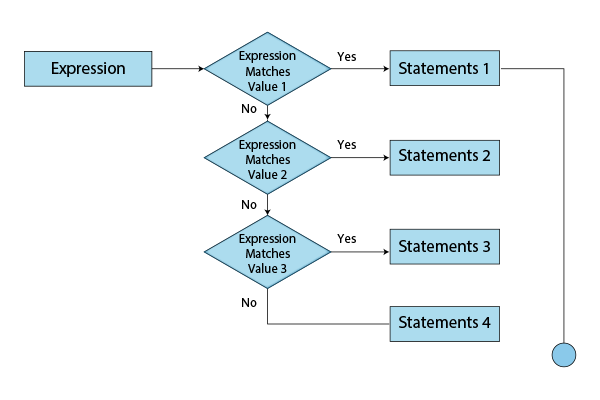
Switch statements are similar to If-Elseif-Else statements in that they are both multi-way branch statements that execute one statement from multiple conditions. However, programmers prefer switch statements over If-Else statements because they are more concise and easier to read.
Syntax:
switch(expression)
{
case value1:
<statements1>
 		break;
case value2:
 		<statements2>
break;
default:
   		<statements3>
}
Flowchart:
Example:
public class Main
{

    public static void main(String[] args)
    {
        int number = 7;
        String x;

        switch (number)
        {
            case 1:
                x= "One";
                break;

            case 2:
                x= "Two";
                break;

            case 3:
                x= "Three";
                break;

            default:
                FirstCode = "FirstCode";
        }
        System.out.println(x);
    }
}
Output:
FirstCode
In the above program, the variable “number” was 7. Since this value does not match any of the cases in the switch statement, the default case is executed, which prints “FirstCode.”
We can experiment with switch statements a lot: we can omit the break statement, move the default condition, work with case variables, enums, strings, and more. If you are interested in learning more about all these, check out our in-depth article on switch statements.
Loop statements in Java
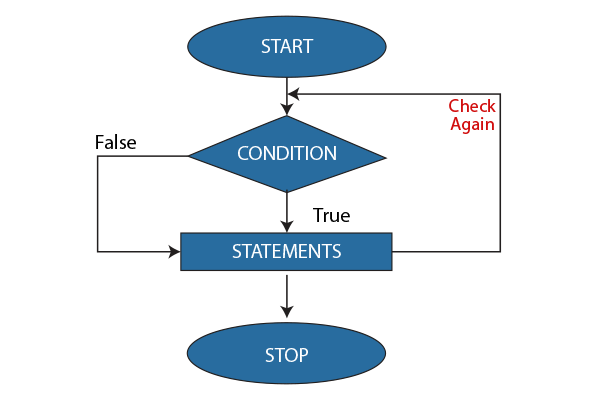
In programming, we sometimes must repeat a code block once a condition is met. Loop statements are used to execute a set of instructions repeatedly, and the execution of the instructions depends on a particular condition. Here is a schematic diagram of loop statements:
The different types of loops are as follows-
While loop in Java
A while loop is a programming instruction that executes a block of code as long as a condition is true. The loop will terminate when the condition is no longer true.
Syntax:
While (condition)
{
<statements>
<updation expression>
}
Flowchart:
Example:
import java.util.Scanner;
public class FirstCode
{
    private static Scanner FC;
    public static void main(String[] args)
    {
        int n, i = 1;
        FC = new Scanner(System.in);

        System.out.print("Enter the number of natural numbers you want to print: ");
        n = FC.nextInt();

        while(i <= n)
        {
            System.out.print(i+ "  ");
            i++;
        }
    }
}
Output:
Enter the number of natural numbers you want to print: 7
1 2 3 4 5 6 7
Do-While loop in Java
A do-while loop is a programming statement that executes a block of code repeatedly if a condition is true. The condition is checked at the end of the loop, ensuring that the code inside the loop is executed at least once. Do-while loops are often used when the number of iterations is unknown.
Syntax:
do
{
    <Statments>
<Updation expression>
}
while (condition);
Example:
import java.util.Scanner;
public class FirstCode
{
    private static Scanner FC;
    public static void main(String[] args)
    {
        int n, i = 1;
        FC = new Scanner(System.in);

        System.out.print("Enter the number of natural numbers you want to print: ");
        n = FC.nextInt();

        while(i <= n)
        do
        {
            System.out.print(i+ "  ");
            i++;
        }
        while(i <= n);
    }
}
Output:
Enter the number of natural numbers you want to print: 5
1 2 3 4 5
For loop in Java
A for loop is a programming construct that iterates over a sequence of values. The loop variable is initialised, the condition is checked, and the value of the loop variable is incremented or decremented all in one line of code. We use a for loop only when we know exactly how many times we want to execute the code block.
Syntax:
for(initialization, condition, increment/decrement)
{
<statements>;
}
Example:
public class FirstCode
{
    public static void main(String[] args)
    {
        for(int j = 1; j<=5; j++)
        {
            System.out.print(j + "  ");
        }
    }
}
Output:
1 2 3 4 5
Jump statements in Java
Jump statements transfer the execution flow to a different part of the program. In other words, they transfer control of execution to another part of the program. Java has two types of jump statements:
Break statement in Java
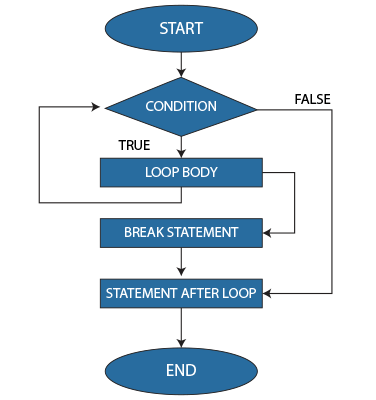
Upon encountering a break statement in a loop, the loop terminates and exits, going to the first statement immediately after the loop.
Flowchart:
Example:
public class FirstCode
{
   public static void main(String args[])
   {
      int [] numbers = {1, 2, 3, 4, 5};

      for(int x : numbers ) {
         if( x == 4 ) {
            break;
         }
         System.out.print( x + "  ");
      }
   }
}
Output:
1 2 3
In this example, we have an array of integers. In the for loop, we check if the number is 4. If it is, we break out of the loop. Therefore, the output prints only the numbers from 0 to 3. When x is equal to 4, the break statement exits the for loop and continues execution at the line “System.out.print(x + ” “);”.
Continue statement in Java
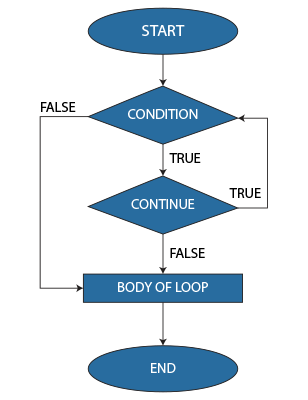
The continue statement skips the current iteration of a loop when a particular condition is met. Unlike the break statement that completely terminates the whole loop when a condition is met, the continue statement only skips the current iteration in which the condition has been satisfied.
Flowchart:
Example:
public class FirstCode
{
     public static void main(String[] args)
    {
        for (int i = 1; i <= 10; i++)
        {
            if (i == 2 || i == 4 || i == 6 || i == 8)
            {
                continue;
            }
            System.out.print(i + " ");
        }
    }
}
Output:
1 3 5 7 9 10
In this program, the for loop prints all numbers from 1 to 10. However, we add an if statement to prevent the numbers 2, 4, 6, and 8 from being printed. Therefore, when the value of i is 2, 4, 6, or 8, the continue statement skips the entire iteration and then goes to the top of the for loop to check the condition for the following number.
Conclusion
You have now learned what control flow statements are, how they are used, and their types. We have examined the 3 types of control flow statements in detail, including their syntax, flowcharts, and code.
However, suppose you really want to strengthen your basics and master each topic. In that case, I suggest you go through our articles on each control flow statement and practice the code examples by trying the ones in the articles and experimenting on your own.